> For the complete documentation index, see [llms.txt](https://tk233.gitbook.io/notes/llms.txt). Markdown versions of documentation pages are available by appending `.md` to page URLs; this page is available as [Markdown](https://tk233.gitbook.io/notes/ml-rl/setting-up-nvidia-tools/nvidia-omniverse-isaac-sim-setup.md).
# Setting up NVIDIA Omniverse Isaac Sim on Ubuntu 22.04 / 20.04
{% hint style="warning" %}
**2024-07-20 Update:**
Omniverse Isaac Sim is deprecated. Please refer to NVIDIA Isaac Lab note: [Getting Started with NVIDIA Isaac Lab on Ubuntu 22.04 / 24.04](/notes/ml-rl/setting-up-nvidia-tools/getting-started-with-nvidia-isaac-lab-on-ubuntu-22.04-24.04.md)
{% endhint %}
## System Overview
NVIDIA RTX 2080
Ubuntu 22.04 with [standard install](https://notes.tk233.xyz/tools/ubuntu-22.04-standard-installation-procedure)
## Prerequisite: NVIDIA Driver
{% content-ref url="/pages/j31LP24d0b9bxwGtaIsa" %}
[Setting up NVIDIA Driver on Ubuntu 24.04 / 22.04](/notes/ml-rl/setting-up-nvidia-tools/setting-up-nvidia-driver-on-ubuntu-24.04-22.04.md)
{% endcontent-ref %}
## Install Omniverse
Download Omniverse from [here](https://www.nvidia.com/en-us/omniverse/download/).
After download, grant the executable right to the .AppImage file.
The installation program requires FUSE to run.
Install FUSE with apt:
```bash
sudo apt install libfuse2
```
Create the file structures in the installation directory:
```bash
mkdir -p ~/Documents/Omniverse/pkg
mkdir -p ~/Documents/Omniverse/data
mkdir -p ~/Documents/Omniverse/contents
mkdir -p ~/Documents/Omniverse/cache
```
Launch the application by either double-clicking it or via the terminal.
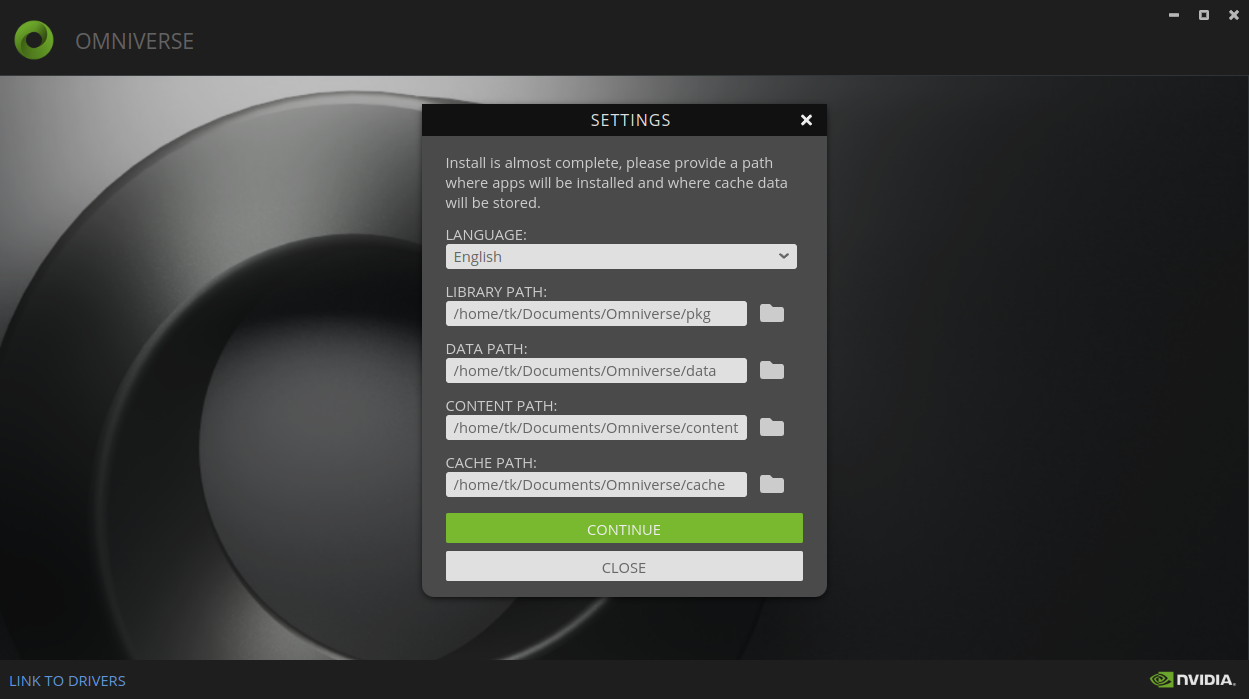
Set up the directories in the launcher. Here's an example setup:
## Install Isaac Sim
Search for "Isaac Sim" in the EXCHANGE tab and click INSTALL button.