> For the complete documentation index, see [llms.txt](https://tk233.gitbook.io/notes/llms.txt). Markdown versions of documentation pages are available by appending `.md` to page URLs; this page is available as [Markdown](https://tk233.gitbook.io/notes/stm32/connectivity/ethernet/ethernet-udp-multicast.md).
# Ethernet - UDP Multicast
In LWIP -> Key Options, click "Show Advanced Parameters", and then enable "LWIP\_MULTICAST\_TX\_OPTIONS".
 Also make sure "MEMP\_NUM\_IGMP\_GROUP" is greater than 1. Here it's defaulted to 8.
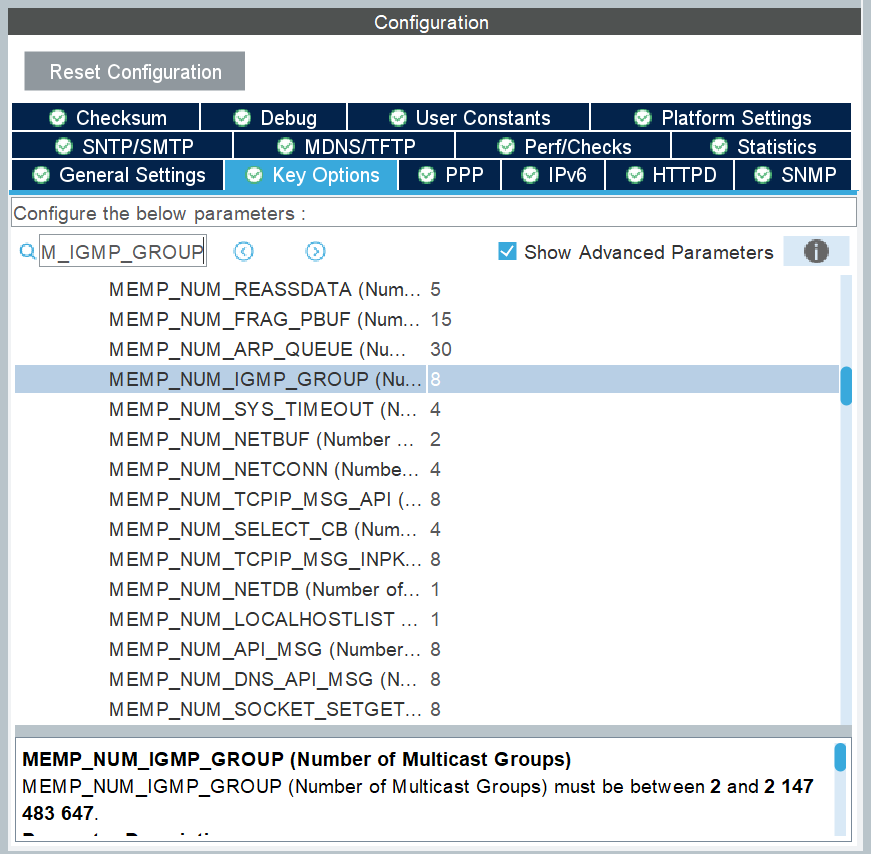 Then, in General Settings, enable "LWIP\_IGMP".
 Open "ethernetif.c", find the `low_level_init()` function.
Add the following line after the "Accept broadcast address and ARP traffic" line to enable IGMP service.
```c
...
/* USER CODE BEGIN PHY_PRE_CONFIG */
netif->flags |= NETIF_FLAG_IGMP;
/* USER CODE END PHY_PRE_CONFIG */
...
```
Define the following UDP multicast helpers
```c
void UDP_multicast_receive_callback(void *arg, struct udp_pcb *pcb, struct pbuf *p, const ip_addr_t *addr, u16_t port) {
if (p != NULL) {
// Copy received data to buffer
char buffer[128];
memcpy(buffer, p->payload, p->len < sizeof(buffer) ? p->len : sizeof(buffer));
// Debug print
char str[128];
sprintf(str, "Received Multicast: %s\n", buffer);
HAL_UART_Transmit(&huart3, (uint8_t *)str, strlen(str), 100);
// Free the packet buffer
pbuf_free(p);
}
}
void UDP_Multicast_init() {
static struct udp_pcb *g_udppcb = NULL; // Make static to prevent deallocation
err_t err;
char str[128];
// allow filter to receive any multicast packet
ETH_MACFilterConfigTypeDef filterConfig = {0};
filterConfig.PromiscuousMode = ENABLE;
filterConfig.PassAllMulticast = ENABLE;
if (HAL_ETH_SetMACFilterConfig(&heth, &filterConfig) != HAL_OK) {
char str[128];
sprintf(str, "Failed to set MAC filter\n");
HAL_UART_Transmit(&huart3, (uint8_t *)str, strlen(str), 100);
}
// set IP address
struct ip4_addr multicast_ip; // multicast group ip
struct ip4_addr device_ip; // this device ip
u16_t port = 7000;
IP4_ADDR(&multicast_ip, 224, 0, 0, 3);
IP4_ADDR(&device_ip, 10, 0, 64, 64);
// Clean up any existing PCB
if (g_udppcb != NULL) {
udp_remove(g_udppcb);
g_udppcb = NULL;
}
// Create new UDP PCB
g_udppcb = udp_new();
if (g_udppcb == NULL) {
sprintf(str, "Failed to create UDP PCB\n");
HAL_UART_Transmit(&huart3, (uint8_t *)str, strlen(str), 100);
return;
}
// Receive from any address (i.e. "0.0.0.0")
err = udp_bind(g_udppcb, IP_ADDR_ANY, port);
if (err != ERR_OK) {
sprintf(str, "Failed to bind UDP: %d\n", err);
HAL_UART_Transmit(&huart3, (uint8_t *)str, strlen(str), 100);
udp_remove(g_udppcb);
return;
}
// Join multicast group
err = igmp_joingroup(&device_ip, &multicast_ip);
if (err != ERR_OK) {
sprintf(str, "Failed to join multicast group: %d\n", err);
HAL_UART_Transmit(&huart3, (uint8_t *)str, strlen(str), 100);
udp_remove(g_udppcb);
return;
}
// Set receive callback
udp_recv(g_udppcb, UDP_multicast_receive_callback, NULL);
sprintf(str, "Multicast initialized successfully\n");
HAL_UART_Transmit(&huart3, (uint8_t *)str, strlen(str), 100);
}
```
And in application code,
```c
void APP_init() {
UDP_Multicast_init();
...
}
void APP_main() {
ethernetif_input(&gnetif);
sys_check_timeouts();
...
}
```
Open "ethernetif.c", find the `low_level_init()` function.
Add the following line after the "Accept broadcast address and ARP traffic" line to enable IGMP service.
```c
...
/* USER CODE BEGIN PHY_PRE_CONFIG */
netif->flags |= NETIF_FLAG_IGMP;
/* USER CODE END PHY_PRE_CONFIG */
...
```
Define the following UDP multicast helpers
```c
void UDP_multicast_receive_callback(void *arg, struct udp_pcb *pcb, struct pbuf *p, const ip_addr_t *addr, u16_t port) {
if (p != NULL) {
// Copy received data to buffer
char buffer[128];
memcpy(buffer, p->payload, p->len < sizeof(buffer) ? p->len : sizeof(buffer));
// Debug print
char str[128];
sprintf(str, "Received Multicast: %s\n", buffer);
HAL_UART_Transmit(&huart3, (uint8_t *)str, strlen(str), 100);
// Free the packet buffer
pbuf_free(p);
}
}
void UDP_Multicast_init() {
static struct udp_pcb *g_udppcb = NULL; // Make static to prevent deallocation
err_t err;
char str[128];
// allow filter to receive any multicast packet
ETH_MACFilterConfigTypeDef filterConfig = {0};
filterConfig.PromiscuousMode = ENABLE;
filterConfig.PassAllMulticast = ENABLE;
if (HAL_ETH_SetMACFilterConfig(&heth, &filterConfig) != HAL_OK) {
char str[128];
sprintf(str, "Failed to set MAC filter\n");
HAL_UART_Transmit(&huart3, (uint8_t *)str, strlen(str), 100);
}
// set IP address
struct ip4_addr multicast_ip; // multicast group ip
struct ip4_addr device_ip; // this device ip
u16_t port = 7000;
IP4_ADDR(&multicast_ip, 224, 0, 0, 3);
IP4_ADDR(&device_ip, 10, 0, 64, 64);
// Clean up any existing PCB
if (g_udppcb != NULL) {
udp_remove(g_udppcb);
g_udppcb = NULL;
}
// Create new UDP PCB
g_udppcb = udp_new();
if (g_udppcb == NULL) {
sprintf(str, "Failed to create UDP PCB\n");
HAL_UART_Transmit(&huart3, (uint8_t *)str, strlen(str), 100);
return;
}
// Receive from any address (i.e. "0.0.0.0")
err = udp_bind(g_udppcb, IP_ADDR_ANY, port);
if (err != ERR_OK) {
sprintf(str, "Failed to bind UDP: %d\n", err);
HAL_UART_Transmit(&huart3, (uint8_t *)str, strlen(str), 100);
udp_remove(g_udppcb);
return;
}
// Join multicast group
err = igmp_joingroup(&device_ip, &multicast_ip);
if (err != ERR_OK) {
sprintf(str, "Failed to join multicast group: %d\n", err);
HAL_UART_Transmit(&huart3, (uint8_t *)str, strlen(str), 100);
udp_remove(g_udppcb);
return;
}
// Set receive callback
udp_recv(g_udppcb, UDP_multicast_receive_callback, NULL);
sprintf(str, "Multicast initialized successfully\n");
HAL_UART_Transmit(&huart3, (uint8_t *)str, strlen(str), 100);
}
```
And in application code,
```c
void APP_init() {
UDP_Multicast_init();
...
}
void APP_main() {
ethernetif_input(&gnetif);
sys_check_timeouts();
...
}
```